Turn the Android TV, $30 stick or tablet you already own into a professional digital signage player. SignPlayer for Android is free for your first 3 screens, forever; larger networks pay from $3 per screen per month.
First published September 6, 2026 · Last updated September 6, 2026
| Device | Typical cost | Best for | Notes |
|---|---|---|---|
| Android TV built into the TV (Sony BRAVIA and other Android TV / Google TV sets) | $0 extra | Single screens, lobbies, waiting rooms | No extra hardware or cables; install the SignPlayer APK on the TV itself |
| Android TV stick or box | $30 to $60 | Menu boards, retail promos, multi-screen rollouts | Plugs into any HDMI TV; easy to replace; buy a model with at least 2GB RAM for video-heavy layouts |
| mediaDROID+ (DigitalSignage.com) | See the mediaPLAYERS page | 24/7 commercial deployments, HD video at 60 fps, kiosks | Hexa-core, Android 9.0 build tuned for signage, not tied to a particular TV |
| Android tablet or phone | $80 and up, or one you own | Countertop displays, small kiosks, sales demos | Runs the same presentations; touch components work on Plus+, full kiosk and touch solutions on Enterprise |
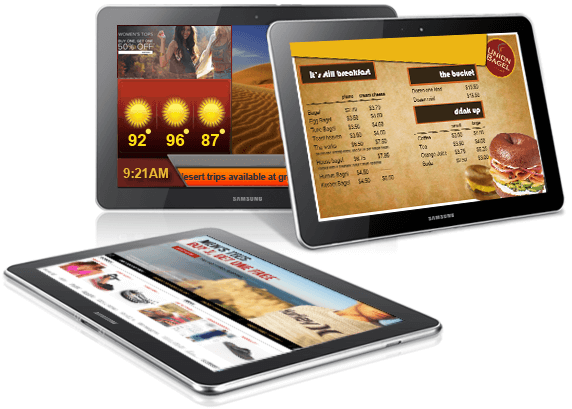
Free for 3 screens, forever. No credit card, no time limit, no ads, about 90% of the feature set. With 4 or more screens, every screen is $3 per month on Plus+, with volume pricing in the public calculator.
Build once, play anywhere. Presentations built in SignStudio run identically on Android, Windows, Mac, Chrome OS, Raspberry Pi and iPad, so a mixed fleet is managed from one dashboard.
Keeps playing offline. SignPlayer caches content locally, so a dropped internet connection does not blank the screen; changes sync when the connection returns.
Restarts itself. The free Watchdog companion app monitors SignPlayer and relaunches it if Android ever kills it, for unattended 24/7 operation.
Live data and triggers. Weather, RSS news, social feeds, stock tickers, countdowns, and IoT triggers from sensors, beacons and APIs all run on Android players.
Remote management. See which players are online, push updates, and give each location its own login, from any browser.
1. Create a free DigitalSignage.com account (no credit card) and build or pick a presentation in SignStudio.
2. On the Android TV, stick or box: Settings → Security & restrictions → allow installation from unknown sources.
3. Download the SignPlayer and Watchdog APKs from your account's Downloads page, either directly on the device's browser or onto a USB stick opened with a file-manager app.
4. Install both APKs, launch SignPlayer, and sign in to pair the device with your account.
5. Assign the presentation to the new screen in SignStudio. Add screens 2 and 3 the same way, still free.
Tablet or phone: same steps, minus the TV settings. Amazon Fire tablets and Fire TV devices run Fire OS, which DigitalSignage.com does not support today; use an Android TV device or the mediaDROID+ instead.
| Screens | DigitalSignage.com | Typical mainstream range ($8 to $30 per screen per month) |
|---|---|---|
| 1 to 3 | $0 (free tier) | $96 to $1,080 |
| 10 | $360 | $960 to $3,600 |
| 50 | $1,800 | $4,800 to $18,000 |
| 100 | $3,600 | $9,600 to $36,000 |
DigitalSignage.com column is $0 up to 3 screens on the free plan; above 3 screens every screen is billed at the $3 Plus+ starting rate; dynamic volume pricing may quote lower. The mainstream range spans Yodeck ($8 to $16), OptiSigns ($10 to $45) and ScreenCloud (from $20) per their published price pages, August 2026. Hardware for an Android stick network is roughly $30 to $60 per screen, one time. Vendor-by-vendor detail in the digital signage cost guide.
What is the best digital signage player for Android?
For most businesses, an Android TV stick or box, or the Android TV built into the set, running the free SignPlayer app: it installs in minutes, caches content for offline playback, restarts itself via Watchdog, and is free for 3 screens then $3 per screen per month. For 24/7 commercial use with heavy HD video, DigitalSignage.com's mediaDROID+ (Android 9.0, hexa-core) is the purpose-built option.
Is there free digital signage software for Android TV?
Yes. SignPlayer for Android is free for your first 3 screens with no time limit, no credit card and no ads, and it runs on Android TV sets, sticks, boxes, tablets and phones.
How do I install a digital signage app on Android TV?
Allow installation from unknown sources in Settings → Security & restrictions, download the SignPlayer and Watchdog APKs from your DigitalSignage.com Downloads page (directly or via a USB stick and a file-manager app), install both, open SignPlayer and sign in to pair the screen with your account.
Does Android digital signage keep working if the internet goes down?
Yes. SignPlayer stores the scheduled content on the device and keeps playing it; updates sync when the connection returns.
Can I use an Android tablet as a digital sign or kiosk?
Yes. Tablets run the same SignPlayer app and presentations. Touch components are included in Plus+, and full kiosk and touch solutions are part of the Enterprise plan.
Do I need a special Android box, or will a cheap stick work?
A cheap stick or box works for menus, promos and most standard layouts. Choose a model with at least 2GB of RAM for video-heavy content, or the mediaDROID+ for demanding 24/7 commercial use.
Start Free on Android — 3 Screens on Us
Android, Android TV and Google TV are trademarks of Google LLC; Sony BRAVIA of Sony; Yodeck, OptiSigns and ScreenCloud of their respective owners. Device prices are typical retail ranges, not quotes.
Checkout live examples of Digital Signage presentations. The SignPlayer can run everywhere, on Android, Windows, Mac, iPad and even inside your web browser
View MoreFind out why people call us “the world’s most popular digital signage platform”
View More Help
Help
 Downloads
 Tutorials
 Login
Login Contact Us
 Cart
Cart