Starting out takes only a couple of minutes, It’s that easy! Open the SignageStudio (Use Web or Desktop version). You will be prompted to select a template & enter an email & password. Next click on [CREATE ACCOUNT] to start building your stuff.
After you played around with the SignageStudio and watched some video tutorials, you’ll be ready to install the SignagePlayer. Choose your favorite OS below and install it on every device and computer you like, and it’s all FREE!
 Get a mediaPLAYER
With our free Digital Signage platform you certainly don`t have to use our hardware, but we definitely recommend it.
Our super optimized, dedicated Digital Signage players were designed specifically for our software. Setup is less than a minute and you will love just how well everything works… Order one, you`ll be happy you did!
Requirements, edition advice and kiosk lockdown for a Windows player: Digital signage on Windows. Using a Mac instead? Digital signage on Mac.
Or just install it yourself on your favorite operating system, get it from the Download page
DownloadOr just install it yourself on your favorite operating system, get it from the Download page
DownloadOr just install it yourself on your favorite operating system, get it from the Download page
DownloadOr just install it yourself on your favorite operating system, get it from the Download page
DownloadThe SignagePlayer Web / Embedded versions allow you to playback your presentation in any browser. With the SignagePlayer Embedded version, you can use an HTML snippet to embed your presentation as part of a web page. With the SignagePlayer Web version you can share your presentation with others using a web link. And the best part, make a change once and have it updated everywhere!
check it now, SignPlayer Web version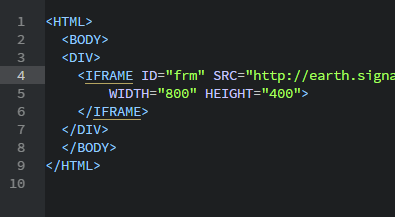
Now you can sit back and watch your presentation go. You will be amazed how easy it was to create a professional Digital Signage network. You’ll probably wonder “Why the other guys are charging so much for their software” and “how glad you are you found DigitalSignage.com”...

Last updated September 7, 2026. Published by DigitalSignage.com (MediaSignage Inc., since 2006).
Do I need a credit card to start?
No. A DigitalSignage.com account asks for an email and a password only. Your first 3 screens are free forever with no time limit and no ads; paid plans start at $3 per screen per month when you add more. Paid plans renew monthly until you cancel, and you can cancel any time from your account.
What do I need to run my first screen?
Any TV or monitor with HDMI, a device to run the free DigitalSignage.com SignPlayer (a $30–$60 Android stick, a Raspberry Pi, a Chromebook or Chrome OS Flex PC, a Windows or Mac computer, or an iPad) and an internet connection for setup; content keeps playing from the local cache if the connection drops.
How long does setup take?
Most people have a screen playing a template within 15 minutes: a few minutes for the account, a few to install SignPlayer, and the rest choosing a template.
Where are the install instructions for my device?
The Downloads page has the installers and the video tutorials cover each platform; there are dedicated guides for Android, Raspberry Pi and Chrome OS.
Checkout live examples of Digital Signage presentations. The SignPlayer can run everywhere, on Android, Windows, Mac, iPad and even inside your web browser
View MoreFind out why people call us “the world’s most popular digital signage platform”
View More Help
Help
 Downloads
 Tutorials
 Login
Login Contact Us
 Cart
Cart Get a mediaPLAYER