Lobby welcome boards, KPI dashboards fed by live data, meeting-room schedules from your calendar, HR and safety notices, and instant emergency messaging across every office and plant. The first 3 screens are free forever; a multi-site company pays from $3 per screen per month.
First published September 6, 2026 · Last updated September 6, 2026
Welcome messages for scheduled visitors, company news, brand video, weather and traffic, plus a branded attract loop after hours.
Sales, tickets, production counts, uptime and safety-days-without-incident, drawn from any XML/JSON data feed and rendered with the charting component, refreshing on their own.
Door-side and corridor screens showing today's bookings from Google Calendar or any calendar feed, so rooms stop being double-booked by walk-ins.
Benefits deadlines, training dates, policy reminders and safety briefings on break-room and plant-floor screens, scheduled per site and shift.
Push an override to every screen in every building in seconds: severe weather, evacuation routes, IT outages, or an all-hands announcement.
Employee spotlights, milestones, curated social posts from the company accounts, and shared files from Google Drive or Dropbox folders that teams already maintain.
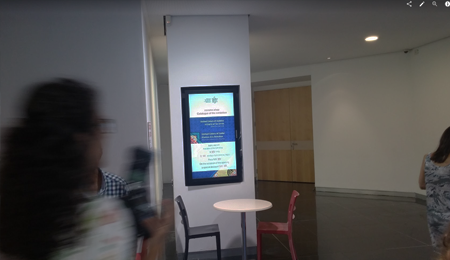
Many sites, one console. Publish a company-wide layout from head office; regional and site sub-accounts add local content within the zones you allow. IT sees the online status of every player in one dashboard.
Screens feed themselves. Calendar, RSS and news, stock and weather widgets, the charting component and any XML/JSON feed keep dashboards and schedules current without a content person on duty.
It runs on hardware you already own. SignPlayer runs on Windows and Mac PCs, Chrome OS devices, Android sticks and Android TV, Raspberry Pi and iPads, and inside any browser, so lobby and break-room TVs need a $30–$60 player or a spare PC. Watchdog restarts the player automatically.
Cloud or on-premise. mediaCLOUD needs no infrastructure; mediaSERVER is a one-time $895 purchase that runs the whole platform inside your own network for companies whose security policy rules out hosted services.
Enterprise controls. White-label branding, SignDashboard multi-account management, access control, proof of play and touch kiosks on the Enterprise plan; Chrome OS support turns retired Chromebooks into players.
The price fits an IT budget. First 3 screens free forever; from $3/screen/month after that with volume pricing in the public calculator, versus $8–$16 on Yodeck, $10–$30 on OptiSigns or $20 on ScreenCloud.
| Deployment | Screens | DigitalSignage.com | Yodeck Basic ($8) | OptiSigns Standard ($10) | ScreenCloud ($20) |
|---|---|---|---|---|---|
| Small office: lobby + break room + one meeting room | 3 | $0 (free tier) | $288 | $360 | $720 |
| Headquarters with meeting-room screens | 20 | $720 | $1,920 | $2,400 | $4,800 |
| Company with 5 sites | 50 | $1,800 | $4,800 | $6,000 | $12,000 |
| Multinational, 40 sites | 400 | $14,400 | $38,400 | $48,000 | $96,000 |
DigitalSignage.com column is $0 up to 3 screens on the free plan; above 3 screens every screen is billed at the $3 Plus+ starting rate; dynamic volume pricing may quote lower, and Enterprise is priced in the public calculator. Competitor columns use each vendor's published entry-tier rate as of August 2026 and exclude hardware. Full dataset: State of Digital Signage Pricing.
1. Create a free account (no credit card, no procurement for the pilot).
2. Plug an Android stick, Chromebox or a spare PC into the lobby TV and install SignPlayer and Watchdog.
3. Pick a corporate template, add company news, the calendar feed for the main meeting rooms and a KPI chart from an existing data export.
4. Publish. Add the break room and one meeting-room screen the same way, still free; roll out to other sites at $3/screen when the pilot is approved.
What digital signage should we use for internal communications?
For most offices and multi-site companies: cloud-managed digital signage such as DigitalSignage.com on the TVs you already own, with a $30–$60 player or spare PC behind each screen, calendar and data-feed components so screens stay current on their own, and site sub-accounts. The first 3 screens are free forever, additional screens cost $3 per screen per month, and a one-time $895 on-premise server is available for networks that cannot use the cloud.
Can the screens show live KPIs and dashboards?
Yes. The charting and data components read any XML or JSON feed and refresh automatically, and RSS, stock, weather and calendar widgets are built in.
Can meeting-room screens show the booking calendar?
Yes. The calendar component displays bookings from Google Calendar or any calendar feed on door-side or corridor screens, updating when the calendar changes.
Can we manage many offices from one place?
Yes. One account publishes company-wide layouts to every site, sub-accounts give each office or department control over its own zones, and the Enterprise SignDashboard manages many accounts from a single console.
Is there an option that does not use the cloud?
Yes. mediaSERVER runs the entire platform on your own infrastructure for a one-time $895 with no monthly fee per screen, for companies whose policies rule out hosted services.
Start a Free Lobby Pilot — 3 Screens on Us
Yodeck, OptiSigns and ScreenCloud are trademarks of their respective owners; pricing cited from published price pages as of August 2026. Related: workplace experience · manufacturing · government · dashboards · mediaSERVER on-premise.
Checkout live examples of Digital Signage presentations. The SignPlayer can run everywhere, on Android, Windows, Mac, iPad and even inside your web browser
View MoreFind out why people call us “the world’s most popular digital signage platform”
View More Help
Help
 Downloads
 Tutorials
 Login
Login Contact Us
 Cart
Cart