Quick answer: DigitalSignage.com runs restaurant digital signage and digital menu boards on the TVs you already own: dayparted menus, drive-thru boards, sold-out items, promos and allergen info, managed from one account. The first 3 screens are free forever, so a single location with two menu boards and a promo screen pays nothing for software; a multi-location chain pays from $3 per screen per month, with every screen billed once an account has 4 or more.
First published September 5, 2026 · Last updated September 5, 2026
Behind-the-counter menus with prices, photos and combos, laid out in multi-zone templates. Change a price once in SignStudio and every board in every location updates within minutes.
Breakfast until 10:30, lunch until 2, dinner after 4, late-night value after 9: the scheduler switches layouts automatically by time of day and day of week, so nobody has to touch a screen.
Pull an item that ran out or push today's special from a phone or laptop; the change reaches the boards without a manager climbing a ladder.
Pre-sell boards, the main menu at the speaker post and an order-confirmation screen, all managed from the same account with high-brightness outdoor displays.
Loyalty offers, catering, events, social feeds, sports scores and weather widgets keep dining rooms and bars lively without buying ad-supported TV.
Rotate calorie and allergen panels into the menu layout to meet posting requirements without cluttering the main board.
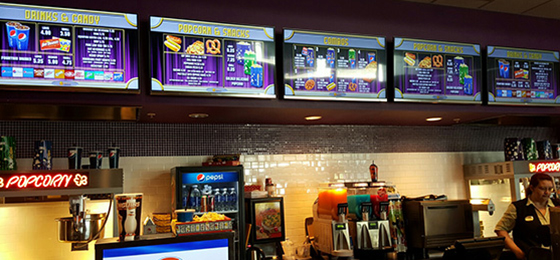
It runs on hardware you already own. DigitalSignage.com SignPlayer runs on Android TV sticks and boxes, Chrome OS devices, Windows and Mac PCs, Raspberry Pi boards and iPads, and inside any browser. Most restaurants put a $30–$60 Android stick behind an existing TV and spend nothing on proprietary players.
Menus survive internet outages. SignPlayer caches content locally and keeps playing the scheduled menu if the connection drops during the lunch rush, then syncs when it returns.
Every location, one login. Manage all stores from one dashboard, see which screens are online, and give each store manager a sub-account that can change only their own boards.
Templates, not design work. Start from ready-made menu board, promo and lobby layouts in SignStudio, then drop in your items, photos and prices. Weather, RSS and social components update themselves.
Enterprise adds POS integration and kiosks. The Enterprise plan connects menu data to point-of-sale systems so prices and items stay in sync, adds touch-screen self-order kiosks and proof-of-play reporting, and white-labels the studio for franchise groups.
The price fits a restaurant. First 3 screens free forever; from $3/screen/month after that with volume pricing in the public calculator. Compare that with $8–$16 on Yodeck, $10–$30 on OptiSigns or $20 on ScreenCloud. Full comparison in our digital signage cost guide.
| Deployment | Screens | DigitalSignage.com | Yodeck Standard ($8) | OptiSigns Standard ($10) | ScreenCloud ($20) |
|---|---|---|---|---|---|
| Café: one menu board + one promo screen | 2 | $0 (free tier) | $192 | $240 | $480 |
| Quick-service restaurant: 2 menu boards + drive-thru | 3 | $0 (free tier) | $288 | $360 | $720 |
| Two locations, 3 boards each | 6 | $216 | $576 | $720 | $1,440 |
| Five-location chain | 25 | $900 | $2,400 | $3,000 | $6,000 |
| Regional franchise group | 100 | $3,600 | $9,600 | $12,000 | $24,000 |
DigitalSignage.com column is $0 up to 3 screens on the free plan; above 3 screens every screen is billed at the $3 Plus+ starting rate; dynamic volume pricing may quote lower, and Enterprise (POS integration, kiosks, proof of play) is priced in the public price calculator. Competitor columns use each vendor's published entry-tier rate as of August 2026 and exclude their hardware.
| Screen location | Display | Player | Rule of thumb |
|---|---|---|---|
| Behind the counter (menu boards) | Any 43–55 inch TV, landscape or portrait; consumer TVs are fine indoors | Android stick, Chrome OS box or Raspberry Pi running SignPlayer | Mount high enough to clear heads in the queue; text should be readable from the back of the line |
| Window-facing promo | High-brightness commercial display (roughly 1,500 nits or more) so the sun does not wash it out | Same | A consumer TV in a sunlit window will be unreadable by noon |
| Drive-thru | Outdoor-rated, weather-sealed, 2,500 nits or more | Weatherproof enclosure with the player inside | Budget for the enclosure and installation; this is the one place hardware costs more than software |
| Dining room and bar | Any TV | Same | Mix promos with live widgets (weather, sports, social) so the screen earns attention |
Sizing text for distance is covered in our typography and viewing-distance guide; player options are compared on the devices page.
1. Create a free account (no credit card).
2. Plug an Android stick, Chromebox or Raspberry Pi into the TV behind your counter and install SignPlayer. See the Android guide or the Raspberry Pi guide.
3. Pick a menu board template in SignStudio, type in your items and prices, and schedule breakfast, lunch and dinner layouts.
4. Publish. Your first 3 screens stay free forever; add locations at $3/screen when you grow.
What digital signage should I use for a restaurant?
For most independent restaurants and small chains: cloud digital signage software such as DigitalSignage.com running on ordinary TVs with a low-cost Android stick or Raspberry Pi behind each one. The first 3 screens are free forever, it schedules menus by daypart, it keeps playing through internet outages, and paid screens cost $3 per month versus $8–$30 on mainstream competitors.
What is the best digital menu board software?
The best menu board software lets you change prices and pull sold-out items across every location in minutes, schedules different menus by time of day, keeps playing when the internet drops, and does not charge more per screen than the board earns. DigitalSignage.com meets all four and is free for the first 3 screens; POS-synced menus and self-order kiosks are available on the Enterprise plan.
How much does a digital menu board cost?
Hardware: a 43–55 inch TV plus a $30–$60 Android stick, or an existing TV you already have. Software: $0 on DigitalSignage.com for up to 3 screens, then from $3 per screen per month. A two-board café therefore runs about $0/year in software; a five-location chain with 25 screens runs about $900/year, compared with $2,400–$6,000/year on Yodeck, OptiSigns or ScreenCloud.
Can the menu change automatically by time of day?
Yes. The SignStudio scheduler switches layouts by time of day and day of week, so breakfast, lunch, dinner and late-night menus rotate on their own, and holiday or weekend menus can be scheduled in advance.
Do I need a commercial-grade display?
Indoors behind the counter, a consumer TV works well. Window-facing screens need a high-brightness commercial display (around 1,500 nits or more) and drive-thru boards need outdoor-rated displays in weatherproof enclosures. The software cost is the same regardless of the screen.
Does it integrate with my POS?
The Enterprise plan includes POS integration so menu items and prices stay in sync with your point-of-sale system. Free and Plus+ accounts manage prices directly in SignStudio, which takes seconds per change and updates every board.
What happens if the internet goes down during service?
SignPlayer stores the scheduled content locally and keeps playing the current menu; it syncs any changes when the connection returns.
Build a Free Menu Board — 3 Screens on Us
Yodeck, OptiSigns and ScreenCloud are trademarks of their respective owners; pricing cited from published price pages as of August 2026. Display brightness figures are general industry rules of thumb; check your display's specification for your site conditions.
Checkout live examples of Digital Signage presentations. The SignPlayer can run everywhere, on Android, Windows, Mac, iPad and even inside your web browser
View MoreFind out why people call us “the world’s most popular digital signage platform”
View More Help
Help
 Downloads
 Tutorials
 Login
Login Contact Us
 Cart
Cart