Promotions, price changes, window displays, endcaps, social walls and queue boards, pushed to every location in minutes from one browser. The first 3 screens are free forever; a chain pays from $3 per screen per month.
First published September 6, 2026 · Last updated September 6, 2026
Change a price or launch a promotion once in SignStudio and every store's screens update within minutes. Schedule weekend deals, seasonal campaigns and clearance boards weeks ahead.
High-brightness screens facing the street run branded loops, new arrivals and opening hours around the clock, dayparted for morning commuters and evening shoppers.
Product videos, comparison charts and cross-sell suggestions next to the products themselves; QR codes send shoppers to reviews, coupons or the online catalogue.
Curated customer photos and posts by hashtag or handle, with final approval before anything appears on the screen.
"Now serving" numbers with the FasterQ component at service counters, pharmacies and returns desks, plus wait-time messaging that keeps lines calm.
News, weather, sports scores and music-video style loops that keep dwell time up in fitting-room areas, cafés and waiting zones.
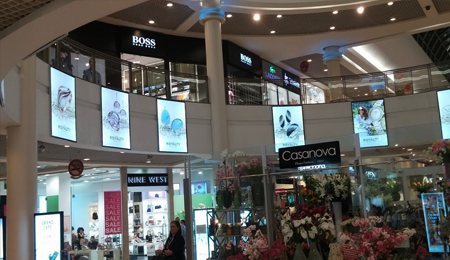
One change, every store. Campaigns, prices and layouts publish from one account to every location; regional and store-level sub-accounts can add local content within the limits you set.
It runs on hardware you already own. SignPlayer runs on Android sticks and Android TV, Chrome OS devices, Windows and Mac PCs, Raspberry Pi and iPads, so a store screen costs an existing TV plus a $30–$60 player. Watchdog restarts the player automatically.
Screens survive the internet going down. Content is cached on each player, so a router reboot or an ISP outage never blanks the sales floor.
Franchise and white-label ready. The Enterprise plan adds white-label branding, SignDashboard multi-account management, proof-of-play reporting for paid brand placements, POS integration and touch kiosks.
Content that updates itself. Weather, news, RSS, social feeds, countdowns and any XML/JSON data feed refresh automatically; 180+ templates cover sales, menus, directories and lobby loops.
The price fits retail margins. First 3 screens free forever; from $3/screen/month after that with volume pricing in the public calculator, versus $8–$16 on Yodeck, $10–$30 on OptiSigns or $20 on ScreenCloud.
| Deployment | Screens | DigitalSignage.com | Yodeck Basic ($8) | OptiSigns Standard ($10) | ScreenCloud ($20) |
|---|---|---|---|---|---|
| Single store: window + counter + endcap | 3 | $0 (free tier) | $288 | $360 | $720 |
| Flagship store | 12 | $432 | $1,152 | $1,440 | $2,880 |
| 20-store chain, 3 screens each | 60 | $2,160 | $5,760 | $7,200 | $14,400 |
| Franchise network | 300 | $10,800 | $28,800 | $36,000 | $72,000 |
DigitalSignage.com column is $0 up to 3 screens on the free plan; above 3 screens every screen is billed at the $3 Plus+ starting rate; dynamic volume pricing may quote lower, and Enterprise is priced in the public calculator. Competitor columns use each vendor's published entry-tier rate as of August 2026 and exclude hardware. Full dataset: State of Digital Signage Pricing.
| Location | Display | Rule of thumb |
|---|---|---|
| In-store promo, endcap, counter | Any consumer TV or monitor, 32–55 inch | Mount above eye level of the queue; keep text large enough to read from the aisle |
| Window-facing | High-brightness commercial display, roughly 1,500 nits or more | A consumer TV in a sunlit window will be unreadable by midday |
| Shelf edge | Small bar displays or tablets | Short loops, one product message at a time |
| Interactive catalogue or kiosk | Touch display or tablet with mediaTOUCH (Enterprise) | Reset to the attract loop after inactivity |
1. Create a free account (no credit card).
2. Plug an Android stick or Chromebox into the counter TV and install SignPlayer and Watchdog.
3. Pick a retail template, drop in this week's promotions and prices, and schedule the weekend layout.
4. Publish. Add the window and endcap screens the same way, still free; roll out to other stores at $3/screen when it proves itself.
What digital signage should I use for a retail store?
For most stores and chains: cloud-managed digital signage such as DigitalSignage.com on ordinary TVs with a $30–$60 Android stick or Raspberry Pi behind each screen. It publishes price and promotion changes to every location in minutes, gives each store manager a limited login, keeps playing offline, and costs $0 for 3 screens then $3 per screen per month, about a third of mainstream competitors.
How much does retail digital signage cost?
Software: $0 on DigitalSignage.com for up to 3 screens, then $3 per screen per month; a 20-store chain with 60 screens is about $2,160 a year versus $5,760–$14,400 on Yodeck, OptiSigns or ScreenCloud. Hardware: an existing TV plus a $30–$60 player indoors, or a high-brightness commercial display for windows.
Can I update prices and promotions in all stores at once?
Yes. A change published in SignStudio reaches every assigned screen in every location within minutes, and layouts can be scheduled in advance by store, region, time of day and day of week.
Can store managers control only their own screens?
Yes. Sub-accounts and permissions limit each user to their own screens and content areas while head office keeps the master layout and a dashboard of every player's status.
Does it support franchise branding and proof of play?
Yes, on the Enterprise plan: white-label branding, SignDashboard multi-account management, proof-of-play reporting for brand-funded placements, POS integration and touch kiosks.
Start Free in One Store — 3 Screens on Us
Yodeck, OptiSigns and ScreenCloud are trademarks of their respective owners; pricing cited from published price pages as of August 2026. Related: restaurants and menu boards · supermarkets · small business · hospitality · touch kiosks.
Checkout live examples of Digital Signage presentations. The SignPlayer can run everywhere, on Android, Windows, Mac, iPad and even inside your web browser
View MoreFind out why people call us “the world’s most popular digital signage platform”
View More Help
Help
 Downloads
 Tutorials
 Login
Login Contact Us
 Cart
Cart